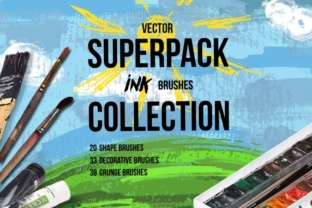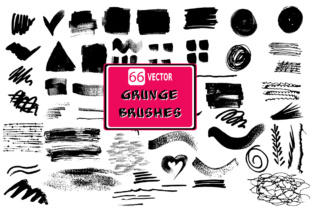
Unlocking Raw Texture: A Deep Dive into the 66 Grunge Brushes Set 1
In the world of digital design, perfection can sometimes feel a bit sterile. We spend hours aligning pixels, smoothing curves, and ensuring every gradient is flawless, only to find that the final piece lacks soul. This is where texture comes in to save the day, and specifically, where the 66 Grunge Brushes Set 1 becomes an indispensable tool in your creative arsenal. This isn't just a collection of stamps; it's a toolkit for adding grit, history, and tangible realism to projects that otherwise might feel too "computer-generated."
When you download this set, you aren't just getting a single file format locked into one workflow. You receive a versatile trio: an EPS file compatible with Adobe Illustrator, a high-resolution JPEG file (3000x4000 pixels at 300dpi), and a layered PSD file with the same crisp specifications. This variety matters because it acknowledges that designers work differently. Whether you are a vector purist who needs scalable shapes or a raster painter who relies on pixel-perfect blending modes, this set meets you exactly where you are.
Breathing Life into Brand Identity and Packaging
One of the most compelling use cases for these brushes lies in branding, particularly for industries that want to convey authenticity. Think about craft breweries, artisanal coffee roasters, or independent streetwear labels. These brands often reject the glossy, corporate aesthetic in favor of something that feels hand-made and rugged. Using the 66 Grunge Brushes Set 1, a designer can take a clean, vector-based logo and overlay subtle distress marks that mimic wear and tear.
Imagine designing a label for a small-batch hot sauce. A flat color background looks fine on a screen, but when printed, it can look cheap. By utilizing the PSD file from this set, you can apply a grunge overlay using blending modes like "Multiply" or "Overlay." The 300dpi resolution ensures that when this goes to print, the texture doesn't turn into a muddy mess of pixels. Instead, it retains sharp, organic edges that look like ink bleeding into rough paper. The result is a package that invites the customer to pick it up, promising a raw and intense experience before they even taste the product.
The Freelancer's Shortcut to High-End Posters
For freelancers working on tight deadlines, creating custom textures from scratch is a luxury of time they rarely have. Scanning old concrete walls or tearing up paper takes effort and equipment. This brush set acts as a massive time-saver without sacrificing quality. The JPEG files included in the download are perfect for quick compositing in Photoshop. You can drag and drop a texture onto a concert poster, mask out the areas you don't need, and instantly achieve that coveted vintage gig poster look.
The sheer volume of 66 distinct brushes means you aren't stuck repeating the same smudge or scratch. Variety is key to realism. In a real-world scenario, if you are designing a flyer for a underground music festival, you might use the sharper, jagged brushes to create torn edge effects, while using the softer, dustier brushes to add atmospheric noise to the background. This layering technique creates depth, making the digital file feel like a physical object that has been posted on a wall for weeks.
Vector Versatility for Scalable Projects
While many designers live in Photoshop, those working in large-format printing or signage often rely on Adobe Illustrator. This is where the EPS file inclusion becomes a game-changer. Vector grunge allows you to scale your textures to the size of a billboard without losing a shred of detail. If you were to stretch a standard pixel-based texture that far, it would pixelate and look amateurish.
Consider a scenario where you are designing a wrap for a delivery van or a massive trade show banner. You need the design to look gritty and urban, but it also needs to remain crisp at 20 feet wide. By importing the EPS vectors from the 66 Grunge Brushes Set 1, you can apply these textures as clipping masks or pattern fills within your vector artwork. This ensures that no matter how large the output, the grunge elements remain sharp and defined. It bridges the gap between the organic feel of analog media and the technical requirements of large-scale digital printing.
Enhancing Digital Illustrations and Concept Art
Digital painters and concept artists often struggle with the "smoothness" of their tools. Digital brushes can sometimes feel too perfect, lacking the unpredictability of traditional media like charcoal or dry ink. Integrating these grunge brushes into your painting workflow can break up uniformity and add a sense of age or environment to your characters and settings.
If you are illustrating a post-apocalyptic scene, the environment needs to look decayed. You can use the high-resolution PSD layers to stamp rust textures onto metal surfaces or mold onto stone walls. Because the files are 3000x4000 pixels, you have plenty of room to crop and rotate the textures to fit specific contours of your illustration. It's not just about slapping a texture on top; it's about using these elements to tell a story about the history of the objects in your scene. The brushes provide the visual vocabulary for dirt, decay, and survival.
Practical Considerations Before You Start
While the 66 Grunge Brushes Set 1 is incredibly powerful, knowing how to wield it effectively requires a bit of restraint. The most common mistake designers make is overusing texture. When every element of your design is covered in grunge, nothing stands out, and the piece becomes visually noisy. It is often more effective to use these brushes selectively—perhaps just on the borders, or only on specific text elements—to create focal points.
Another consideration is the color mode. Since the JPEG and PSD files are provided at 300dpi, they are optimized for print (CMYK conversion is usually smooth), but if you are working strictly for web graphics, you might want to downsample the images to keep file sizes manageable. However, starting with high-resolution source files is always the smarter move; you can always reduce quality later, but you can never add detail back in. The flexibility of having the EPS, JPEG, and PSD formats means you can choose the right tool for the job without compromising your initial vision.
Furthermore, think about the context of your audience. A grunge aesthetic resonates deeply with certain demographics, evoking feelings of rebellion, nostalgia, or authenticity. However, for a corporate financial report or a medical brochure, these textures might send the wrong message. Understanding the emotional weight of "grunge" is just as important as the technical application. The 66 Grunge Brushes Set 1 gives you the raw materials, but your judgment determines whether those materials build a masterpiece or a mess.
Ultimately, this set is about expanding your creative palette. It offers a shortcut to complexity, allowing you to focus on composition and messaging while letting the textures handle the atmospheric heavy lifting. Whether you are scaling a vector for a city-wide campaign or adding a subtle grain to a social media graphic, having access to 66 unique, high-fidelity grunge elements ensures that your work never has to feel flat again.