Spring into Design with Floral Procreate Stamps
There is a specific kind of creative friction that happens when you are trying to build a digital illustration from scratch. You have the vision, but the execution of repetitive elements—like the delicate petals of a peony or the textured center of a sunflower—can eat up hours of your billable time. This is where Floral Procreate Stamps change the workflow entirely. For professionals and hobbyists alike, these tools are not just shortcuts; they are foundational assets that allow you to focus on composition and storytelling rather than rendering every single leaf.
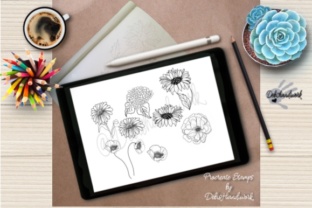
When we talk about Procreate floral spring stamps, we are discussing a curated collection designed to capture the essence of the season. The library typically includes high-resolution renders of classic blooms: the voluminous layers of a Hydrangea, the papery delicacy of a Poppy, the lush romance of a Peony, the cheerful simplicity of a Daisy, and the bold presence of a Sunflower. Having these ready-to-use elements at your fingertips means you can pivot from a blank canvas to a polished draft in minutes.
Why These Stamps Elevate Your Digital Workflow
The primary strength of using dedicated stamp brushes lies in their consistency and quality. Unlike downloading random PNGs from the web which often suffer from compression artifacts or inconsistent lighting, professional Floral Procreate Stamps are engineered specifically for the Procreate engine. They maintain crisp edges regardless of how you scale them, ensuring your final output looks professional whether it is viewed on a retina display or printed on heavy cardstock.
Furthermore, these stamps offer a level of versatility that static images cannot. Because they function as brushes within the app, you can adjust opacity, flow, and blending modes instantly. Need a faded background element for a wedding invitation? Lower the opacity. Want a bold, graphic statement for a poster? Switch the blend mode to Multiply or Overlay. This flexibility allows creators to adapt the same asset across different projects without losing visual cohesion.
Unlocking Creativity with Warp and Distort
One of the most underutilized features in Procreate is the Transform tool, specifically the Warp and Distort functions. When working with Procreate floral spring stamps, these tools become your best friends for creating custom arrangements that don't look "stamped."
Imagine you are designing a border for a client's branding package. You place a row of Hydrangeas along the bottom. Instead of leaving them perfectly uniform, use the Warp tool to gently curve the stems, mimicking natural growth patterns. You can pull individual control points to make a Sunflower lean into the light or compress a Peony to fit a tight corner. The Distort feature allows you to change the perspective of a flower, making it look as though it is lying flat on a table or receding into the distance. This level of manipulation transforms a simple stamp into a bespoke illustration element, adding a human touch that clients and audiences appreciate.
Practical Applications Across Industries
The utility of these floral assets extends far beyond simple doodling. Here is how different professionals can leverage them:
- Note Cards and Stationery: For entrepreneurs selling handmade goods, time is money. Using a combination of Poppies and Daisies, you can rapidly prototype dozens of note card designs. The ability to swap out flowers while keeping the layout intact allows for quick A/B testing of products before committing to a large print run.
- Social Media Graphics: Marketers and bloggers need fresh content daily. A well-placed Sunflower stamp can frame a quote graphic, while a cluster of Peonies can soften the edges of a promotional post. These elements increase engagement by adding visual warmth and approachability to digital communications.
- Educational Materials: Educators creating worksheets or presentation decks can use these stamps to make learning materials more inviting. A biology lesson on plant life cycles becomes more engaging with accurate, beautiful illustrations of Hydrangeas and Poppies that students can color digitally or use as reference.
- Poster Design: Event planners and artists can create striking posters for spring festivals or farmers' markets. By layering different floral stamps and utilizing the distortion tools mentioned earlier, you can create dynamic, sweeping compositions that draw the eye from across a room.
Technical Considerations for iPad Users
It is important to note that these Floral Procreate Stamps are designed exclusively for the iPad and Procreate app. They leverage the specific brush engine of the software, meaning they will not function as standard image files in Photoshop or Illustrator without first being stamped onto a canvas and exported. This ecosystem specificity ensures optimal performance; the brushes are optimized to prevent lag even when you are building complex, multi-layered compositions.
When evaluating which stamp set to purchase or download, look for variety in the bloom stages. A good set shouldn't just have fully opened flowers; it should include buds and side-profile views. This variety is crucial for creating realistic borders and frames. For instance, mixing a closed Peony bud with a full-bloom Daisy creates a rhythm in your design that feels organic rather than repetitive.
Maximizing Efficiency Without Sacrificing Quality
In the professional world, efficiency often gets a bad reputation for implying "cutting corners." However, using high-quality stamps is about smart resource management. It frees up your mental energy to focus on color theory, typography, and overall composition. When you aren't worrying about painting every stamen of a Hydrangea, you can spend that time perfecting the kerning on your headline or choosing the perfect paper texture for your background.
Moreover, these tools democratize high-end design. You do not need to be a master botanical illustrator to create stunning floral art. With the right Procreate floral spring stamps, a freelance graphic designer can offer floral branding packages to clients, expanding their service offerings and revenue streams. A blogger can create unique headers that match their site's aesthetic without hiring an illustrator.
Ultimately, the value of these stamps lies in their ability to bridge the gap between imagination and execution. Whether you are crafting a heartfelt note card for a friend, designing a marketing campaign for a local business, or creating educational content for your classroom, these tools provide the building blocks for beautiful work. By combining the pre-made elegance of Poppies, Sunflowers, and Daisies with your own creative manipulation via warp and distort, you create something uniquely yours. The iPad becomes not just a consumption device, but a powerful studio capable of producing commercial-grade art in record time.