Igniting Creativity: A Deep Dive into Energy Photoshop Brushes for Dynamic Design
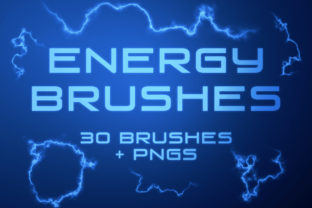
In the ever-evolving landscape of digital art and graphic design, the difference between a static image and a captivating visual narrative often lies in the details. Specifically, it is the infusion of motion, light, and atmosphere that transforms a flat composition into something alive. For designers, photographers, and content creators seeking to inject vitality into their work, Energy Photoshop Brushes have emerged as an indispensable tool. This collection is not merely a set of stamps; it is a comprehensive digital download comprising 30 specialized Photoshop brushes and 30 matching PNGs, designed to simulate electric currents, smoky wisps, and raw kinetic force.
The Anatomy of Digital Energy
Understanding the utility of this pack requires looking beyond the surface. When we speak of "energy" in a visual context, we are referring to elements that suggest power, movement, and transformation. The Energy Photoshop Brushes included in this set feature a diverse array of electric arcs and smoky currents. These are not generic shapes; they are textured, organic forms that mimic the unpredictable nature of electricity and vapor.
One of the most critical technical aspects of this collection is its resolution. Each of the 30 brushes is crafted at a large scale, reaching up to 2500 pixels. Why does this matter? In professional design, scalability is king. A brush that looks crisp at 500 pixels may become pixelated and unusable when stretched to fit a high-resolution banner or a print poster. With these brushes, creators have the freedom to scale the effects up or down without losing fidelity. Whether you are designing a small social media icon or a massive billboard, the integrity of the electric spark or smoke trail remains sharp.
Beyond the Brush Tool: The Power of PNGs
While traditional brush sets are invaluable for those who live inside Adobe Photoshop, the modern workflow is rarely linear. Creators often switch between software, use tablets with limited app support, or collaborate with teams who do not have access to specific plugin installations. This is where the inclusion of 30 high-quality PNGs adds significant value to the package.
Each brush in the set has a corresponding PNG file. These images come with transparent backgrounds, making them universally compatible. You do not need to install anything to use them. The process is as simple as drag-and-drop. This flexibility opens the door for users of Canva, Procreate, After Effects, or even basic word processors to incorporate professional-grade energy effects. For a business owner creating a quick promotional graphic, or a video editor needing a sudden flash of lightning for a title card, the PNGs offer an immediate solution without the learning curve of mastering brush dynamics.
Practical Applications Across Industries
The versatility of Energy Photoshop Brushes means they find homes in a wide variety of projects. Let us explore how different professionals might leverage this toolset.
- Digital Artists and Illustrators: Concept artists working on sci-fi characters or fantasy environments can use the electric currents to visualize magical abilities or futuristic weaponry. The smoky currents add atmospheric depth to scenes, suggesting recent explosions or mystical portals.
- Photographers: Portrait photographers often seek to create surreal or high-impact edits. By overlaying these energy effects, a standard portrait can be transformed into a superhero poster or a moody, artistic statement piece. The ability to blend modes (such as Screen or Linear Dodge) allows these effects to interact naturally with the underlying photo.
- Marketing and Advertising: In the competitive world of ad creatives, grabbing attention within seconds is crucial. Energy effects draw the eye. A sale banner featuring electric sparks around the discount percentage creates a sense of urgency and excitement that plain text cannot achieve.
- Social Media Managers: Platforms like Instagram and TikTok thrive on dynamic visuals. Using the PNGs, managers can quickly annotate stories or create thumbnail overlays that pop, increasing click-through rates and engagement.
Workflow Efficiency and Creative Freedom
Time is a non-renewable resource for creators. Painting realistic lightning or smoke from scratch requires advanced skill and hours of rendering. Energy Photoshop Brushes democratize this capability. They allow a junior designer to achieve results that mimic senior-level retouching in a fraction of the time. However, efficiency should not come at the cost of creativity. Because the brushes are large and detailed, they serve as a foundation rather than a final product.
A seasoned professional will use these brushes as a starting point, masking out areas, adjusting opacity, and color-grading the effects to match the scene's lighting. The variety within the 30-brush set ensures that you are not repeating the same stroke twice. Some strokes are jagged and aggressive, perfect for representing high-voltage danger. Others are soft and billowing, ideal for representing steam or low-energy magic. This range allows for nuanced storytelling within a single image.
Evaluating Suitability for Your Projects
Before integrating any new asset into your library, it is wise to evaluate its fit for your specific needs. While Energy Photoshop Brushes are powerful, they are stylistic tools. They work best in projects that embrace a heightened reality. If your brand guidelines strictly mandate flat, minimalist design with no textures or effects, these brushes may sit unused. However, for gaming studios, event promoters, music album cover designers, and YouTube channel artists, they are practically essential.
Consider the medium you are working in. If you are preparing files for print, the 2500-pixel resolution is generally sufficient for most standard applications, but always check your DPI requirements. For web and screen-based media, these assets are more than adequate. Furthermore, consider the color palette of your project. While these brushes likely come in white or grayscale to allow for easy recoloring via blending modes, ensure your software workflow supports these adjustments if you need specific hues like neon blue or fiery orange.
Strengths and Limitations
No tool is without its considerations. The primary strength of this pack lies in its dual-format delivery. Providing both .ABR (brush) files and .PNG images covers nearly every possible user scenario. The high resolution ensures longevity; you won't need to replace these assets when you upgrade to a 4K monitor or a higher-resolution camera.
However, users should be aware that "energy" effects can easily become cliché if overused. The limitation here is not the tool, but the application. Slapping a lightning bolt on every image can make a portfolio look dated or amateurish. The key is subtlety and context. Use the smoky currents to guide the viewer's eye, not just to fill empty space. Additionally, while the PNGs are convenient, they lack the dynamic pressure sensitivity of the actual brushes. If you need the stroke to taper based on how hard you press your stylus, you must use the installed brush files within Photoshop, not the static PNGs.
Final Thoughts on Enhancing Visual Impact
In conclusion, the Energy Photoshop Brushes collection represents a smart investment for anyone looking to elevate their digital toolkit. It bridges the gap between complex manual painting and instant graphical enhancement. By offering 30 unique variations in both brush and PNG formats, it respects the diverse workflows of today's creative community.
Whether you are a hobbyist experimenting with photo manipulation for the first time or a professional agency churning out high-volume ad creatives, the ability to instantly add electric and smoky elements streamlines your process. It allows you to focus less on the mechanics of creating light and more on the composition and message of your art. As digital media continues to demand more engaging and dynamic content, having a reliable source of high-quality energy effects is not just a luxury—it is a strategic advantage. Embrace the spark, experiment with the smoke, and let these tools help you tell more electrifying stories.