Mastering Winter Atmospheres with 100 Snow Photoshop Stamp Brushes
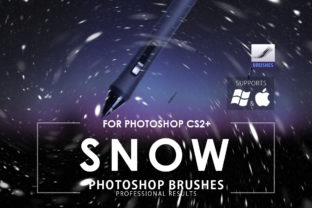
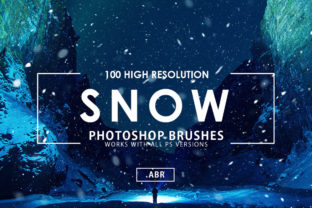
Creating a convincing winter scene in digital art often hinges on the smallest details. While lighting and composition set the stage, it is the texture of falling snow that truly sells the atmosphere of cold and stillness. For designers, photographers, and digital artists, manually painting thousands of individual snowflakes is an inefficient use of time. This is where a comprehensive collection like the 100 Snow Photoshop Stamp Brushes becomes an indispensable asset. This toolset is designed to bridge the gap between complex manual illustration and instant, high-quality atmospheric effects, allowing creators to focus on storytelling rather than repetitive pixel placement.
Understanding the Core Asset: Versatility in Two Files
One of the immediate strengths of this specific brush pack is its thoughtful approach to compatibility. Digital workflows vary wildly depending on the age of the software being used. To address this, the package includes two distinct .ABR files. The first file is optimized for legacy versions of the software, specifically covering the range from Photoshop CS2 to CS5. The second file is engineered for modern iterations, supporting CS6 through the latest Creative Cloud (CC) versions and beyond.
This dual-file structure ensures that whether you are working on an older workstation in a school lab or utilizing the latest features on a high-end studio rig, the functionality remains seamless. There is no need to worry about corrupted files or missing presets; the assets are pre-configured to load correctly regardless of your environment. Inside these files reside 100 different snow designs, offering a vast library of shapes, sizes, and densities. This variety prevents the "stamped" look that often plagues lower-quality brush sets, where every flake looks identical, breaking the illusion of reality.
High-Resolution Foundations for Professional Output
In the world of print and high-definition digital media, resolution is paramount. A common pitfall with free or low-cost brush sets is low-resolution source images that become pixelated when scaled up. These brushes are built on a robust foundation, boasting a 5000x5000 pixel resolution. This massive canvas size means that even if you are working on a large-format poster, a billboard, or a 4K video background, the individual snowflakes retain their crisp edges and intricate details.
The high resolution also provides flexibility in post-processing. Because the source data is so rich, you can apply transformations, rotations, and scaling without degrading the quality of the effect. This characteristic is particularly valuable for professionals who cannot afford to compromise on image fidelity. It allows the 100 Snow Photoshop Stamp Brushes to be used in commercial projects where print standards are strict, ensuring that the final output looks as professional as the concept.
Workflow Techniques: From Single Click to Complex Storms
The primary appeal of stamp brushes is speed, often described as a 1-click effect. Indeed, selecting a brush and clicking on the canvas instantly places a cluster of snowflakes. However, to move from a basic overlay to a compelling visual narrative, one must employ specific layering techniques. The most effective method for building intensity is to duplicate layers.
By stacking multiple layers of snow, each with slightly different opacity levels and blend modes, you create depth. A single layer might look flat, but three or four layers, offset slightly, simulate the parallax effect seen in real life where snow falls at different distances from the camera. You can set the foreground layer to "Screen" or "Overlay" for bright, sharp flakes, while setting background layers to "Soft Light" with a lower opacity to mimic distant, out-of-focus snow. This technique transforms a simple stamp into a volumetric weather event.
Refining the Look: Sharpening and Motion
While the brushes come ready to use, integrating them perfectly into an existing image often requires minor adjustments to match the source photo's characteristics. Two specific filters are highlighted as essential tools for refining these effects: Unsharp Mask and Motion Blur.
If the snow appears too soft or blends too much with a noisy background, applying Filter – Sharpen – Unsharp Mask can define the edges of the flakes. This makes the snow pop against darker backgrounds, adding a crispness that suggests freezing temperatures. Conversely, static snow can sometimes look unnatural, as falling snow almost always has some velocity. To counteract this, users are encouraged to apply Filter – Blur – Blur of your choice.
The standard Motion Blur filter is particularly effective here. By angling the blur to match the wind direction in your base image and adjusting the distance, you can make stationary stamps appear to be rushing past the lens. You might even combine these approaches: keep the foreground snow sharp using Unsharp Mask to draw the viewer's eye, while applying a heavy Motion Blur to background layers to simulate speed and depth of field. This level of control allows the 100 Snow Photoshop Stamp Brushes to adapt to any scene, from a gentle flurry to a blizzard.
Practical Applications Across Industries
The utility of this toolset extends far beyond simple holiday cards. For photographers, these brushes offer a way to salvage a shot taken on a cloudy day by adding a winter ambiance that was missing during the shoot. It allows for the creation of consistent branding imagery for winter sales campaigns without the need for expensive location shoots in freezing conditions.
Digital painters and concept artists benefit immensely from the 100 unique designs. When creating environments for games or films, varying the snow shape prevents visual fatigue. The ability to quickly block in a snowy landscape allows artists to iterate on compositions rapidly. Furthermore, graphic designers working on packaging, such as limited edition winter beverages or cosmetics, can use these high-res stamps to create textured backgrounds that feel tactile and premium.
Even social media managers and content creators can leverage these tools. In a feed dominated by visual content, a subtle snow overlay can increase engagement during the winter months, making posts feel timely and relevant. The ease of use means that even those with intermediate Photoshop skills can achieve professional-grade results in minutes.
Evaluating Suitability and Limitations
While the 100 Snow Photoshop Stamp Brushes are powerful, it is important to have realistic expectations. Stamp brushes are best suited for adding atmosphere and mid-ground to foreground detail. They are not a replacement for 3D particle systems when creating high-end cinematic visual effects where every flake must interact physically with light and objects in a 3D space. For static images and web graphics, however, they are unparalleled in efficiency.
Users should also consider the color profile of their project. While these brushes are likely designed to work well on various backgrounds, snow is not purely white; it reflects the colors of its environment. To achieve maximum realism, users should experiment with the "Color Overlay" layer style or paint over the snow lightly with ambient colors from the scene. This integrates the effect so it feels like part of the original photograph rather than a sticker placed on top.
Conclusion: Elevating Winter Visuals
In the competitive landscape of digital content, the difference between a good image and a great one often lies in the details. The 100 Snow Photoshop Stamp Brushes provide a robust, flexible, and high-quality solution for injecting winter magic into any project. With their dual-file compatibility, massive 5000x5000 resolution, and diverse design library, they cater to a wide spectrum of creative needs.
By mastering simple techniques like layer duplication and strategic filtering, users can transcend the limitations of a standard stamp tool. Whether you are sharpening flakes for clarity or blurring them for motion, these brushes offer the foundational elements needed to craft believable, emotive winter scenes. For anyone looking to streamline their workflow without sacrificing artistic integrity, this collection represents a significant value add to the digital toolkit, proving that sometimes the most impactful changes come from the simplest tools used with expertise.