Evaluating the Inktober 2019 Photoshop Brush Collection for Professional Digital Art
Digital artists often face a significant hurdle when transitioning from traditional media to software: the loss of tactile authenticity. While vector tools offer precision, they frequently lack the organic imperfection that gives hand-drawn work its soul. This is where specialized asset packs become critical components of a professional workflow. The Inktober 2019 Photoshop Brushes collection represents a targeted solution to this problem, offering a suite of tools designed specifically to replicate the behavior of physical ink on paper within the Adobe Photoshop environment. For creators ranging from freelance illustrators to marketing agencies producing custom content, understanding the utility and limitations of such a resource is essential before integrating it into a production pipeline.
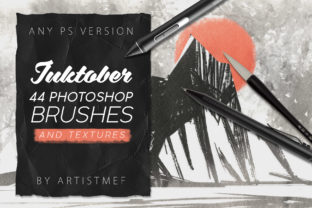
The primary value proposition of this collection lies in its specific preparation for the Inktober event, an annual challenge that encourages artists to create one ink drawing every day in October. However, the utility of these assets extends far beyond a single month of social media posting. The pack includes 44 different pressure-sensitive brushes, a number that suggests a comprehensive approach to inking rather than a superficial add-on. In professional practice, having a diverse array of nib sizes and flow characteristics allows an artist to maintain consistency across a project without manually adjusting settings for every stroke. This efficiency is crucial for meeting tight deadlines in commercial illustration or concept art.
Technical Specifications and Fidelity
When evaluating digital brushes, resolution and sensitivity are the defining factors of quality. This collection operates at 3000x3000 pixels at 300 dpi. From a technical standpoint, this resolution is robust enough for high-quality print production, including posters, book covers, and merchandise, not just web display. Many free or low-cost brush sets suffer from pixelation when scaled up or used in large-format prints; this specification mitigates that risk, ensuring that line edges remain crisp and textures remain detailed regardless of the canvas size.
The inclusion of pressure sensitivity is non-negotiable for serious digital painters. These brushes are engineered to respond to stylus input, varying line weight and opacity based on how hard the user presses. This dynamic range is what separates amateur-looking digital art from work that mimics traditional media. The ability to transition smoothly from a hairline to a thick, saturated stroke within a single movement is vital for calligraphy and expressive line art. Furthermore, the compatibility note stating that all Photoshop versions are supported is a significant practical advantage. Professionals often work in varied environments, some sticking to older, stable versions of Creative Cloud while others utilize the latest updates. Universal compatibility ensures that freelancers collaborating with different studios or educators teaching in computer labs with mixed software versions can utilize the tool without friction.
Versatility in Style and Application
The scope of this brush set is notably broad, covering styles ranging from precise pen drawing to techniques reminiscent of Chinese art. This versatility makes the Inktober 2019 Photoshop Brushes suitable for a wide demographic of users. For instance, a graphic designer creating a logo with an organic, hand-lettered feel can utilize the calligraphic variants, while a concept artist sketching character designs might rely on the finer pen tools for anatomical details. The mention of "Chinese art" styles implies the presence of brushes with variable taper and wet-edge capabilities, which are excellent for creating fluid, expressive strokes that dry with natural gradients.
Beyond standard inking, the collection incorporates special effects such as spray, wet edge, and grunge. These textural elements are particularly valuable for marketers and content creators looking to break away from the sterile "vector look" that dominates much of modern corporate design. Adding a subtle grunge overlay or a spray-paint texture can give a brand's visual identity a more human, approachable, and artisanal quality. In the context of blog headers, social media graphics, or editorial illustrations, these effects add depth and visual interest that flat colors cannot achieve.
The Role of Included Textures
A often overlooked but critical component of realistic digital painting is the interaction between the brush and the surface. This pack includes 15 bonus textures, which serves to enhance the realism of the final output. When applied correctly, these textures can simulate the tooth of watercolor paper, the grain of newsprint, or the roughness of canvas. For educators teaching digital art, these textures provide an excellent opportunity to demonstrate how surface interaction affects ink flow. For professionals, they offer a quick way to unify a piece, tying together disparate elements with a consistent underlying grain. This reduces the need to source external overlays, streamlining the post-processing phase of a project.
Workflow Integration and Practical Limitations
Integrating a new brush set requires an assessment of workflow impact. With 44 brushes, there is a potential for "choice paralysis," where an artist spends too much time testing tools rather than creating. However, the categorization implied by the description—line art, calligraphy, painting, and effects—suggests a logical organization that aids quick selection. It is advisable for users to curate a smaller subset of their favorites from the pack for daily use, keeping the full library available for specific textural needs.
While the collection offers significant strengths, users should maintain realistic expectations regarding automation. These brushes imitate painting styles; they do not automatically generate art. The skill of the operator remains the primary determinant of quality. A novice user may struggle to achieve the same fluidity as an experienced illustrator, regardless of the brush quality. Additionally, while the brushes support all Photoshop versions, users on very old hardware may experience slight latency with high-resolution, complex brush tips, though the 3000px size is generally optimized for modern processing speeds.
Target Audience and Strategic Value
Who benefits most from the Inktober 2019 Photoshop Brushes? The primary beneficiaries are:
- Freelance Illustrators: Who need reliable, high-fidelity tools to deliver client work that mimics traditional media without the scan-and-clean-up workflow.
- Small Business Owners and Marketers: Seeking to differentiate their brand visuals with unique, hand-crafted aesthetics that stand out against stock photography and generic vectors.
- Educators and Bloggers: Who require versatile assets for creating engaging instructional diagrams or header images that convey creativity and expertise.
- Hobbyists: Looking to improve their digital painting skills with tools that encourage experimentation with different cultural art styles and textures.
For entrepreneurs and publishers, the long-term value of this asset lies in its reusability. Unlike a single template, a brush set is a foundational tool that can be used across hundreds of projects over years. The investment in a high-quality, pressure-sensitive set pays dividends in time saved on texturing and line refinement.
Final Assessment
In the landscape of digital art resources, the Inktober 2019 Photoshop Brushes collection stands out due to its technical specifications and stylistic breadth. The combination of high-resolution tips, pressure sensitivity, and supplementary textures provides a solid foundation for realistic digital inking. While it requires a degree of artistic skill to maximize its potential, the toolset removes many of the technical barriers that prevent digital work from achieving an organic feel. For professionals seeking to enhance their visual vocabulary with authentic ink textures and varied line weights, this collection offers a practical, reliable, and versatile addition to the digital toolkit. Its compatibility across software versions and suitability for both fine art and commercial applications makes it a sound consideration for any serious creator's library.